
Contents—click to jump to the section:
Shared Lessons allow two students to join the same lesson with you.
As the teacher, you will guide a discussion and help both practice clarification, disagreeing, rephrasing, and other elements of multi-speaker conversations.
One of the two will be the Host Subscriber, the second will be their invited Guest. The Host will have pre-selected the topic for the Shared Lesson; it was their choice to discuss this topic with their Guest.
Some Guests will be Newcomers to NEI. Our goal is to help these Guests (Newcomers) feel welcome and comfortable. We want them to have so much fun that they will want to purchase their own NEI subscription. This is your chance to help increase the number of students booking lessons with you!
Guests (Newcomers) might not have NEI Scores because they received a Guest Pass to try NEI. Be prepared to adjust your delivery to the Guest’s level to give them a great experience!
There are some notable differences between a Shared Lesson and a standard 1:1
DO NOT ask for the students to summarize a Replay Challenge Question
DO NOT review any assignments
DO NOT use the suggested Question Sets from either account
As you read through the Shared Lesson process, navigation of the NEI platform should seem highly familiar.
Teaching a Shared Lesson
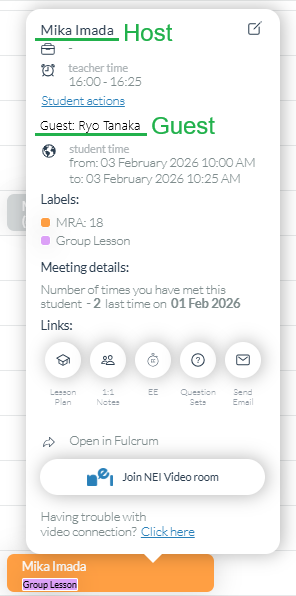
1.) Identify Shared Lessons on your schedule by the Group Lesson indication on the scheduled appointment

The name and NEI Score Color (Green, Blue, Orange, Red) will be for the HOST student
2.) See the name and NEI Account of the GUEST student here:
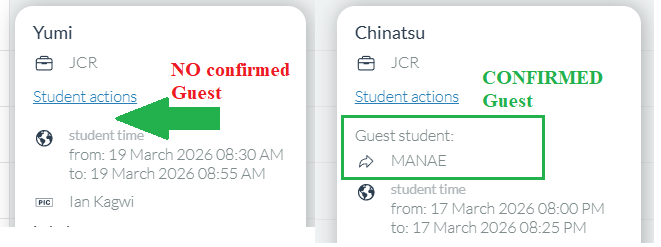
A Shared Lesson can be on your schedule but no Guest confirms, in which case, you teach it like a regular 1:1. COMPARE a Shared Lesson with NO Guest confirmation, and one with a CONFIRMED Guest:
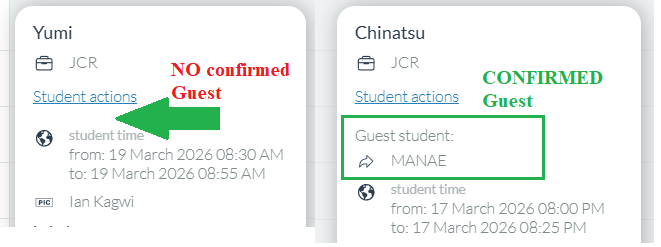
If no Guest Confirms the Shared Lesson, there will NOT be a Shared Lesson Topic and Questions.

Write down the names of participants, clearly noting who is the HOST and who is the GUEST so that you address them both correctly.
Remember, GUESTS (Newcomers) might not have NEI Scores because they received a Guest Pass to try NEI; be prepared to adjust your delivery to the GUEST’s (Newcomer) level.
How to know if a Guest is a Newcomer
Their bio boxes will be empty
They will not have an NEI Score
Their Subscription* will be Try Free
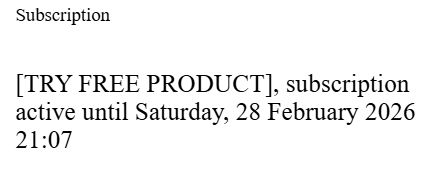
*Scroll down on their account page to find the Subscription box on the left side
3.) Identify today's TOPIC and QUESTIONS
Select the “Group Appointments” icon from the HOST student’s account:
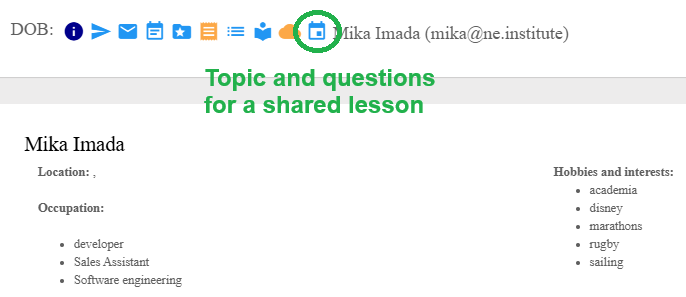
Shared Lesson TOPICS are only used once and consist of 5 Questions; they correspond to the date of the Shared Lesson in Pacific time:
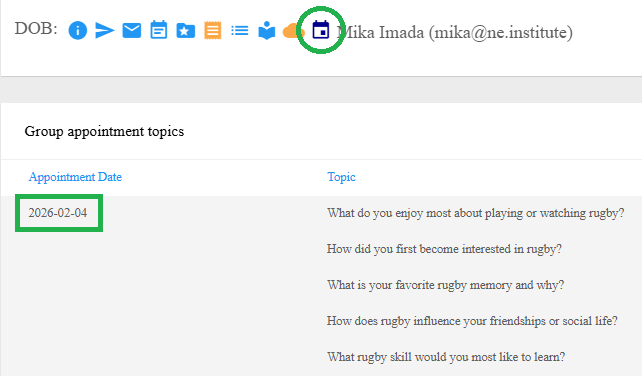
There are no checkboxes as these Shared Lesson topics will only ever be used once.
4.) Start the Shared Lesson with some small talk
Gauge the Guest’s English level (if necessary)
Establish participants’ relationship
“How do you know each other?”
Ask the Host, “Can you tell me two things about [GUEST NAME]?”
And then the Guest, “Can you tell me two things about [HOST NAME]?”
As the participants begin engaging with each other, it’s interesting to note that the Japanese language does not commonly use “you” when talking directly to someone! When you encounter someone avoiding using “you” in English, make the correction and let them know it’s totally acceptable.
5.) Introduce the TOPIC for today’s Shared Lesson
“Today we’re going to talk about [TOPIC]. [HOST NAME], why did you choose this topic?”
Hearing why the topic was selected can inform your follow-up questions and facilitation between participants.
6.) Work through the TOPIC questions
Ensure that participants engage with each other’s ideas and/or both have opportunities to respond to questions
As always, ask meaningful follow-up questions to deeply engage with ideas before moving on to the next question on the list.
Most importantly, make sure participants are engaging with each other’s ideas and contributing equally. Refer to Phrases for Small Group Facilitation
It’s great if the participants’ input drives the conversation, and you only use one or two questions from the list! We want them to see the benefit and enjoy interacting in English with each other.
Correct both participants’ mistakes
Have both learners practice the corrected grammar, pronunciation, and vocabulary
Give both learners level-appropriate opportunities to use the targeted language from corrections
7.) Wrap up Shared Lesson
Ask each participant, “What was fun about today’s conversation?”
Do not leave a Replay Challenge Question.
8.) Writing 1:1 Notes and Lesson Plan Notes
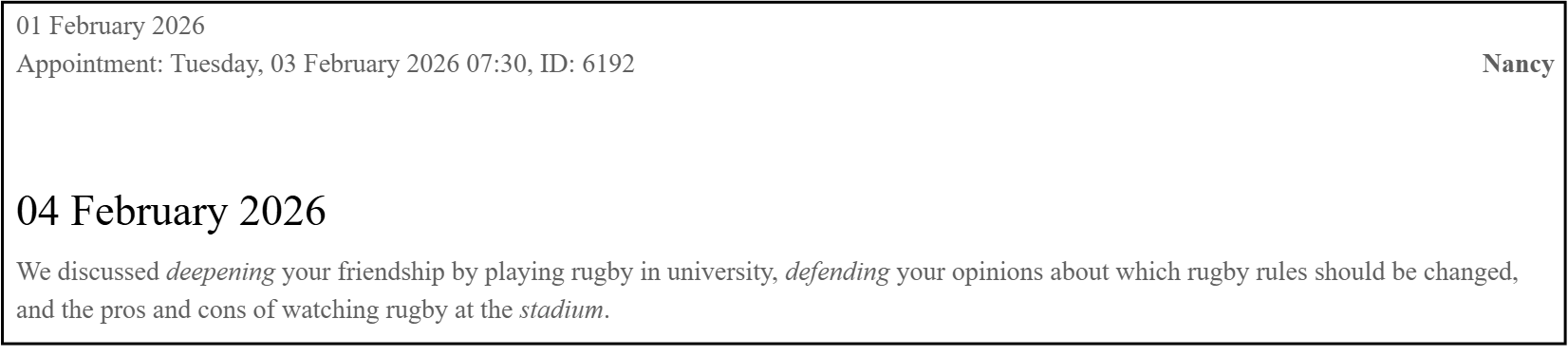
You only need to write one 1:1 Note; it will be displayed on BOTH the Host and Guest accounts
Delete all lines from the standard template except for “We discussed”
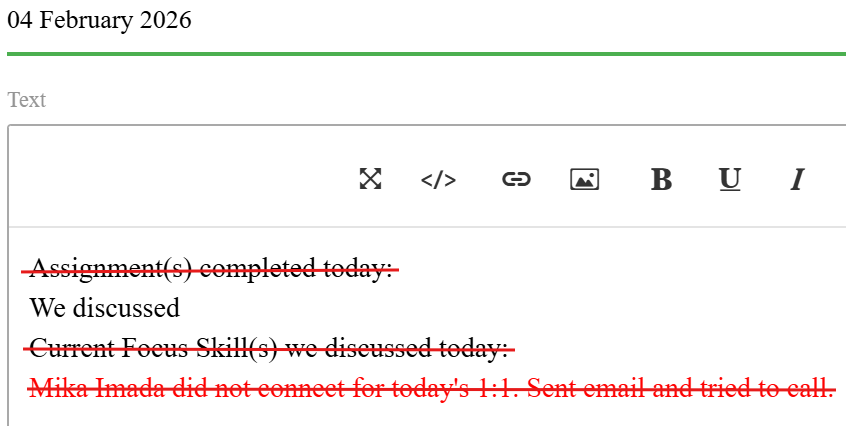
Even delete Current Focus Skills for Red-level learners; they are not the priority for a Shared Lesson
Your 1:1 Note should focus on the main points of interaction between the learners: shared experiences, arguments, collaborative ideas, etc.
Lesson Plan notes will remain brief. Please indicate
It was a shared lesson
How the participants know each other
Approximate English level of the Guest (Newcomer) — beginner, intermediate, or advanced
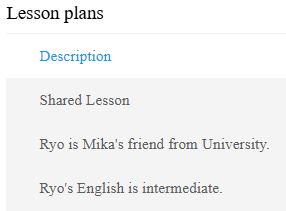
You’re welcome to share anything else that came up in the Shared Lesson that would help turn Guests (Newcomers) into subscribers!
Shared Lesson Quick Reference
COMPARE a scheduled Shared Lesson with NO Guest confirmed and one with a CONFIRMED Guest.
If no Guest Confirms the Shared Lesson, there will not be a Shared Lesson Topic and Questions.
If the GUEST has not confirmed their attendance and does not join the Shared Lesson, please collect some information from the HOST using this questionnaire: GUEST NO-CONFIRMATION CHECKLIST.

Write down the names of participants, clearly noting who is the HOST and who is the GUEST so that you address them both correctly.
Small Talk and Icebreakers
“How do you know each other?”
Ask the Host, “Can you tell me two things about [GUEST NAME]?”
And then the Guest, “Can you tell me two things about [HOST NAME]?”
Introduce the topic
“Today we’re going to talk about [TOPIC]. [HOST NAME], why did you choose this topic?”
Facilitate the discussion
Use the Small Group facilitation phrases to have participants engage with each other’s ideas.
Wrap up
Ask each participant, “What was fun about today’s conversation?”
What to do if only the HOST attends
Sending an appointment reminder or marking a student as missed is done from the lesson block on your schedule, just as with a standard 1:1 lesson.
Don’t forget to mark the GUEST as missed after the lesson ends!
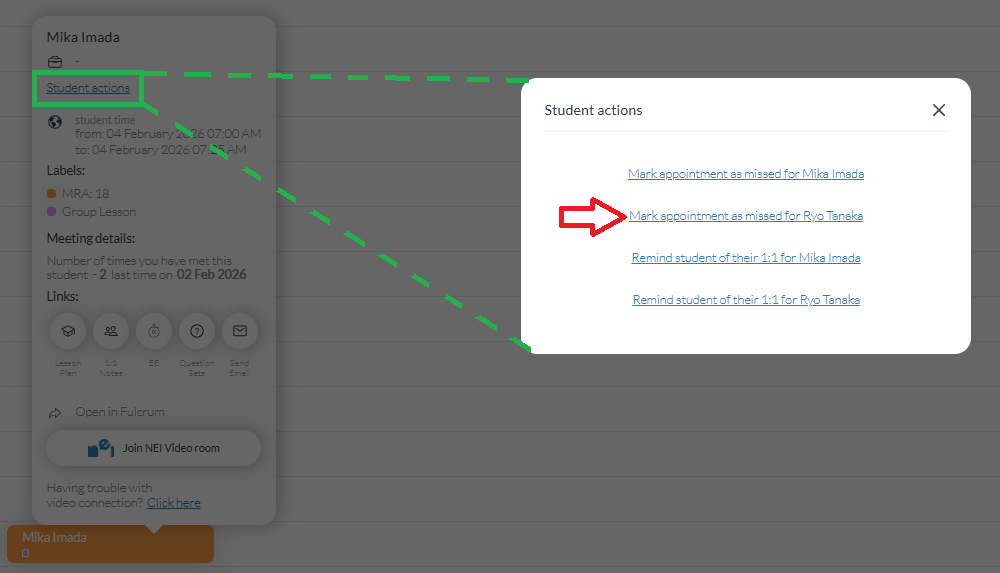
1.) If the GUEST has not arrived after 1 minute
Ask the HOST, “Will [GUEST NAME] be joining us today? I will send them a reminder.”
Send a reminder notification to the GUEST
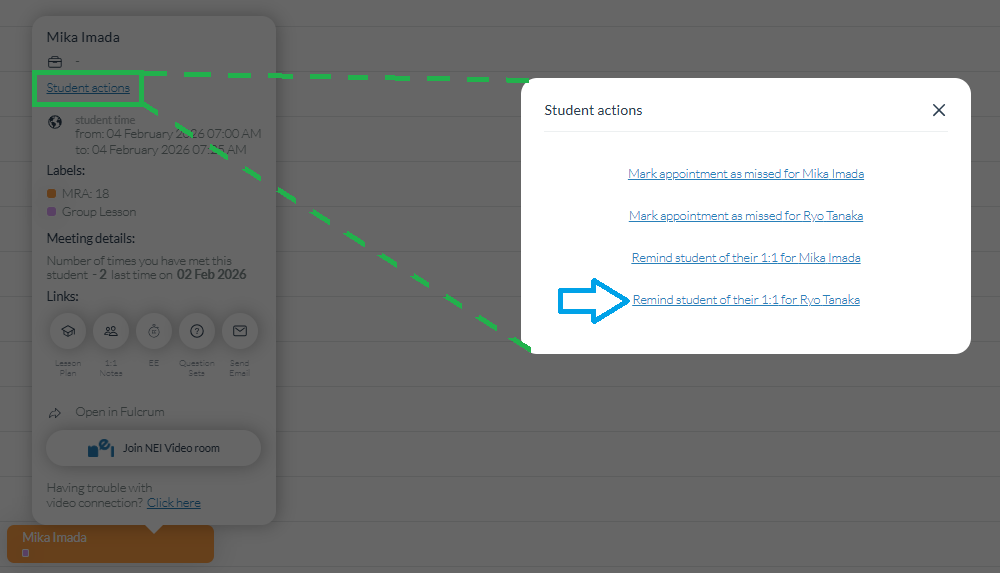
Before moving on, collect some information from the HOST using this questionnaire: GUEST NO-CONFIRMATION CHECKLIST.
2.) Conduct a standard 1:1 with all of the normal procedures
Ask for the answer to their Replay Challenge Question
Review their assignment
Note, as they were expecting to do a Shared Lesson, they may not have prepared a Replay Challenge Answer or completed an assignment
Use the appropriate Question Set from their suggested Question Sets
Just like a standard 1:1
3.) If the GUEST joins late, begin conducting a Shared Lesson, working from the Shared Lesson TOPIC
What to do if only the GUEST attends
Sending an appointment reminder or marking a student as missed is done from the lesson block on your schedule, just as with a 1:1 lesson.
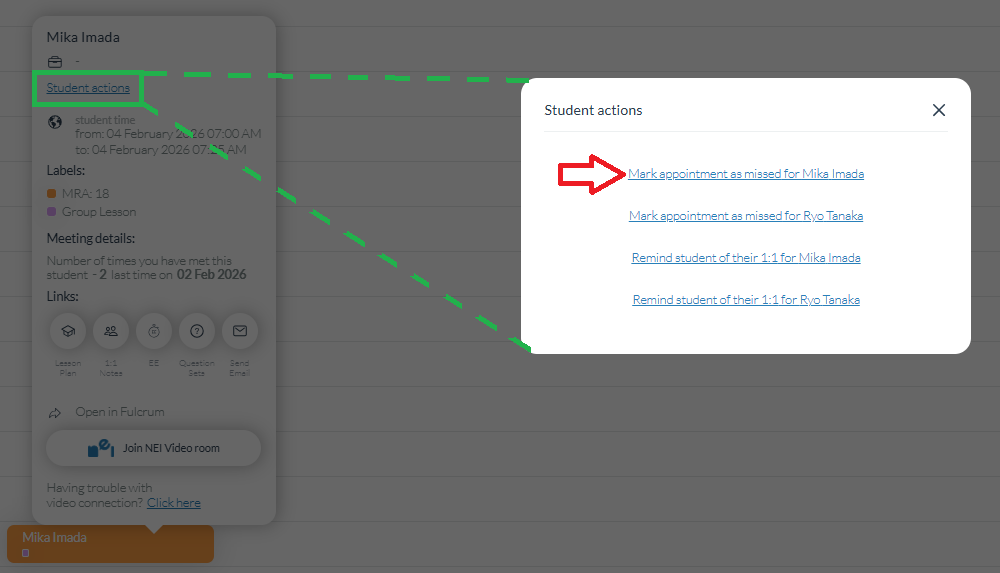
Don’t forget to mark the HOST as missed after the lesson ends!
1.) If the HOST has not arrived after 1 minute
Ask the GUEST, “Will [HOST NAME] be joining us today? I will send them a reminder.”
Send a reminder notification to the HOST
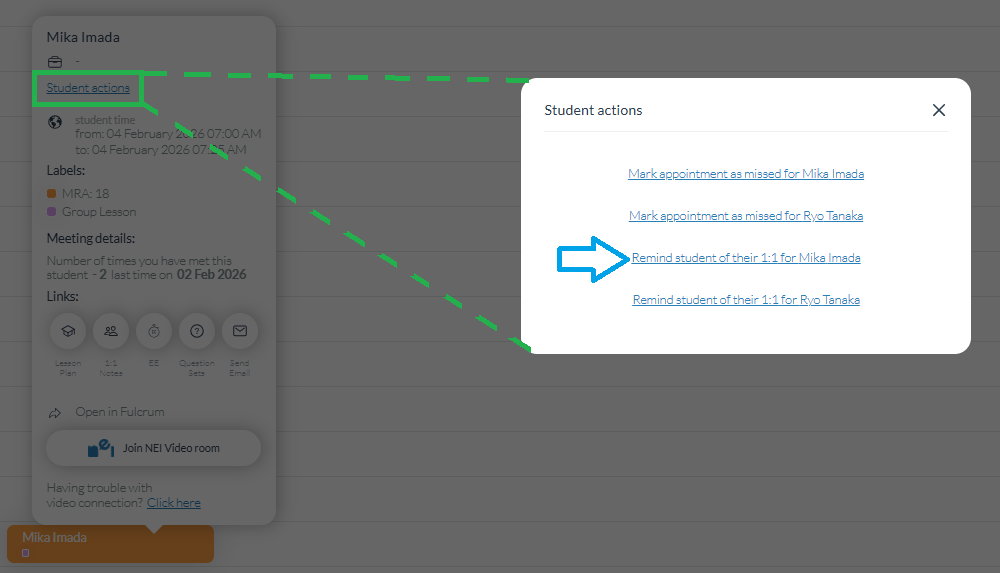
2.) Begin a 1:1 with the GUEST
GUESTS (Newcomers) are not NEI subscribers and, therefore, do not have any suggested Question Sets. In this case, proceed with the Shared Lesson Topic:
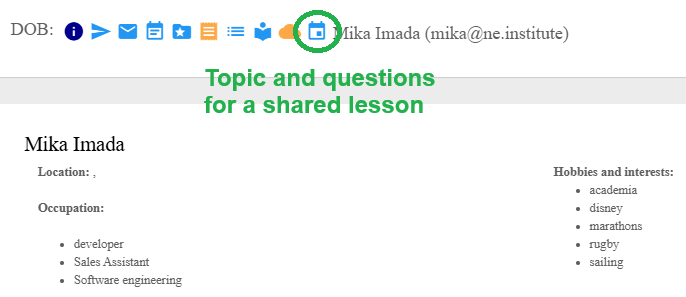
Begin the topic by saying “[HOST NAME] chose to talk about [TOPIC] today. Why do you think they chose [TOPIC]?”
If the GUEST is an active NEI participant, they will have Question Sets available for use.